Reprint Diploma for Employees

This task includes instructions to reprint diplomas for employees if you are a training administrator.

  1. Go to the Training tab. The Training and Assignments screen displays.
  2. Click View Previous Assignments.
  3. Select the assignment for which you want to reprint a diploma and click Open.
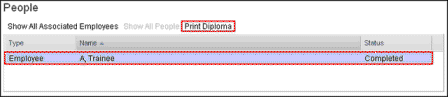
  4. Select the completed trainee listed under the People section of the assignment. The Print Diploma option is enabled.
  5. Click Print Diploma.

    Print Diploma

    The system displays the diploma as a .pdf.